
This post contains affiliate links. If you purchase through our links, we may earn a small commission at no extra cost to you.
“Ergonomic home office setup” and “under desk treadmill” are two of the most searched workspace terms in the US in 2026, and for good reason. Remote work has become a permanent reality for millions of Americans, and the health consequences of poor workspace setup are now well-documented: neck pain from screens at the wrong height, back strain from poor seating, fatigue from sitting all day without movement. In 2026, the most searched home office upgrades are the ones that directly address these physical challenges, monitor arms that position screens at eye level, under-desk treadmills that add movement to the workday, ergonomic accessories that protect posture, and wellness items that make the home office genuinely healthy to work in every day. All of these products are pulled directly from Amazon’s current bestseller lists.
We’ve researched Amazon’s current bestsellers in ergonomic and wellness home office products to bring you 10 top-rated picks that protect your health and boost your productivity every day.
Our Top Picks at a Glance
| Product | Category | Key Feature | Price Range |
|---|---|---|---|
| WALKINGPAD Foldable Under Desk Treadmill (No Assembly) | Under Desk Treadmill | Foldable, adaptive speed, compact, no assembly | $250–$380 |
| MOUNTUP Single Monitor Arm — Up to 32″, Black | Monitor Arm | Full motion, 4.4–17.6 lbs, clamp/grommet, black | $28–$48 |
| HUANUO Dual Monitor Stand — 13–40″, USB Hub | Dual Monitor Arm | Dual arm, USB ports, full motion, clamp/grommet | $65–$100 |
| Ergotron LX Single Monitor Arm — 34″, Matte Black | Premium Monitor Arm | Premium build, 7–25 lbs, patented OVS technology | $95–$135 |
| Logitech MX Master 3S Wireless Mouse | Ergonomic Mouse | Silent clicks, ultra-fast scroll, 8000 DPI, multi-device | $80–$105 |
| Insta360 Link 2 AI 4K Webcam — AI Tracking | Webcam | 4K, AI motion tracking, AI noise cancellation, gesture control | $150–$200 |
| Flexispot EN2 Electric Standing Desk (55×28″, Black) | Standing Desk | Electric, clamp power strip, cable management, 55″ | $280–$380 |
| Cushion Lab Extra Dense Lumbar Pillow Support | Lumbar Support | Memory foam, dual strap, universal chair fit | $35–$55 |
| Everlasting Comfort Seat Cushion — Memory Foam | Seat Cushion | Coccyx cutout, memory foam, non-slip, washable cover | $30–$50 |
| VIVO Desk Converter — Dual Monitor Sit-Stand Riser | Desk Converter | Dual monitor riser, wide keyboard tray, no assembly | $85–$130 |
Best Under Desk Treadmill, WALKINGPAD Foldable Walking Pad (Adaptive Speed, No Assembly)

- Powerful & Quiet Brushless Motor (1–5 MPH): Powered by a high-quality brushless motor with a speed range of 1–5 MPH, thi…
- Removable Safety Handle Bar for Peace of Mind: Walk with confidence using the sturdy, detachable handle bar that adds ex…
- Ultra-Slim& Foldable Treadmill for Small Spaces: Built with an ultra-thin deck (only about 1.69 inches thick) and a 180°…
- Adaptive speed control adjusts automatically to your walking pace no manual adjustments needed
- Folds flat for storage under a desk or against a wall when not in use
- No assembly required unfold and walk within minutes of unboxing
- Amazon bestseller in under-desk treadmills WALKINGPAD is the most trusted walking pad brand in the category
~$320
Under-desk treadmills are the most significant home office wellness trend of 2026, and “under desk treadmill” is consistently one of the top-searched home office product terms of the year. The reason is simple: sitting for 6-8 hours daily is now recognized as a serious health risk. The WALKINGPAD is Amazon’s most trusted walking pad brand, with adaptive speed technology that automatically adjusts to your walking pace so you can walk and work simultaneously without manual speed management.
Why we love it
- Adaptive speed control responds to your natural walking pace just start walking and it follows you
- Folds completely flat stores under a desk or in a closet in under 10 seconds
- No assembly required the most important feature for a product that arrives in a large box
- Quiet motor allows walking during calls and video meetings without noise disruption
The downside | Walking pad treadmills are best used at 1-3 mph walking pace for work not suitable for running or high-intensity exercise during work sessions.
Who it’s for | Remote workers who sit for extended hours daily and want to add movement, improve energy, and reduce the long-term health consequences of sedentary work, the single most impactful home office wellness upgrade available.
Best Monitor Arm, MOUNTUP Single Monitor Desk Mount (Up to 32″, Full Motion, Black)

- Adjustable Tension Arm for Perfect Balance: Built with a long-lasting tension system that has passed over 20,000 rigorou…
- Full Motion Monitor Stand: Tilt -45°/+90°, swivel ±180°, rotate 360° for portrait/landscape, extend up to 19.6 inches, h…
- Universal VESA Compatibility: Fits 75×75mm and 100×100mm VESA patterns. Compatible with most 17-32 inch flat/curved moni…
- Full motion arm adjusts height, tilt, swivel, and rotation positions screen at exact ergonomic eye level
- Supports monitors from 13″ to 32″ and 4.4-17.6 lbs, fits virtually all standard home office monitors
- Clamp or grommet base options works with any desk type
- Amazon’s #1 bestselling monitor arm the most purchased monitor mount on the platform
A monitor arm is one of the highest-impact ergonomic upgrades available it positions your screen at exact eye level, eliminates neck strain from looking down at a monitor on a riser, and frees up valuable desk space beneath the monitor. The MOUNTUP is Amazon’s #1 bestselling monitor arm and it earns that position by delivering full motion adjustment at the most accessible price in the category.
Why we love it
- Full motion adjusts height, tilt, swivel, and rotation to the exact ergonomic position for any user
- Frees desk space beneath the monitor the most immediate visible desk declutter available
- Cable management channels route monitor cables cleanly along the arm
- Amazon’s #1 monitor arm backed by an enormous base of verified purchase reviews
The downside | Maximum 17.6 lb monitor capacity very large ultrawide monitors (34″+) may exceed this limit; check your monitor’s weight before ordering.
Who it’s for | Anyone whose monitor sits flat on the desk or on a fixed riser the adjustable arm immediately corrects screen height, eliminates neck strain, and clears desk space simultaneously.
Best Dual Monitor Arm, HUANUO Dual Monitor Stand (13–40″, USB Hub, Full Motion)

- Improved Stability for Ultrawide Monitors: The upgraded dual monitor stand combines solid aluminum arms, a larger base, …
- Taller & Longer Arms: Our dual monitor mount is designed for smooth and precise adjustments. It comes with enlarged arms…
- Full Motion Adjustments: This heavy-duty dual monitor arm lets you swivel your screens from -90° to +90°, tilt from -30°…
- Supports dual monitors up to 40″ each handles large monitor setups and ultrawide configurations
- Built-in USB hub on the arm charges devices and connects peripherals without reaching to the back of the monitors
- 26.4 lbs capacity per arm handles heavier professional monitors
- Amazon bestseller in dual monitor arms HUANUO is the most trusted dual arm brand
Dual monitor setups are the standard for serious home office work in 2026, and dual monitor arms that properly support large screens require specific weight ratings and arm span. The HUANUO HNDS7 is Amazon’s top-rated dual arm for its combination of 40-inch monitor support, built-in USB hub convenience, and the 26.4 lb per arm capacity that handles professional-grade monitors that lighter arms can’t support.
Why we love it
- Supports monitors up to 40″ each handles the ultrawide monitors increasingly popular in 2026 home offices
- USB hub built into the arm keeps ports accessible without cable runs to the back of monitors
- Independent arm adjustment position each monitor at different heights for different tasks
- Frees the entire dual-monitor desk footprint creates significant usable desk space below both screens
The downside | Dual arm setup requires an adequately sturdy desk clamp attachment on thin or hollow-core desk surfaces may not provide sufficient stability for heavy monitors.
Who it’s for | Developers, designers, traders, and power users running dual large monitors who want independent height adjustment, USB accessibility, and maximum desk space below both screens.
Best Premium Monitor Arm, Ergotron LX Single Monitor Arm (34″, Matte Black, OVS Technology)

- Broad compatibility: Fits single screens up to 34 inches diagonal and 7 to 25 pounds; compatible with VESA patterns 75×7…
- Versatile mounting options: Includes two-piece desk clamp and grommet mount to fit a variety of desk types; desk clamp a…
- Improved comfort: Easily raise your monitor up to 17.3 inches above your worksurface with 13 inches of lift; find your b…
- Patented OVS (Overextended Variable Spring) technology arm holds position effortlessly at any height
- Supports flat, curved, and ultrawide monitors up to 34″
- Ergotron is the gold standard monitor arm brand used in professional studios and corporate offices
- Amazon bestseller in premium monitor arms with the highest quality rating in the category
Ergotron has been the professional standard for monitor arms in commercial settings for decades and the LX is the home office version that brings that professional-grade quality into a format sized for desk use. The patented OVS spring technology means the arm holds precisely in position without drift a meaningful difference from budget arms that slowly tilt down under monitor weight over time.
Why we love it
- OVS patented spring holds position without drift the monitor stays exactly where you set it indefinitely
- Works with flat, curved, and ultrawide monitors the most versatile single arm specification available
- Ergotron quality is the professional standard significantly more durable than budget alternatives
- Smooth, effortless repositioning at any time one hand repositions the monitor without tools
The downside | Premium price point the Ergotron LX costs 3x more than the MOUNTUP but delivers meaningfully superior build quality and precision that professional users will notice daily.
Who it’s for | Full-time remote workers who use their monitor 6-8 hours daily and want the premium build quality and precision that the professional standard monitor arm delivers over budget alternatives.
Best Ergonomic Mouse, Logitech MX Master 3S Wireless Mouse (Silent, 8000 DPI)

- Ideal For: IT departments that need secure wireless connections and easy deployment. Also analysts, creators and coders …
- Enterprise Secure: Logi Bolt is designed to meet enterprise security concerns with fully encrypted, Secured Connections …
- Built For Scale: Certified in over 100 countries with support for IT pros and business users. Centralized Management for…
- Silent click technology reduces click noise by 90% no click sound during calls or in shared spaces
- MagSpeed electromagnetic scroll wheel navigates 1,000 lines per second fastest scroll available
- Ergonomic sculpted shape supports natural hand and wrist position for extended use
- Amazon bestseller in performance wireless mice Logitech MX Master 3S is the most purchased productivity mouse
The Logitech MX Master 3S is consistently Amazon’s most purchased productivity mouse and it’s the tool that most directly reduces the repetitive strain and wrist fatigue that affects home office workers using basic mice daily. The ergonomic sculpted shape positions the hand and wrist in a natural angle, the silent clicks work in any call environment, and the MagSpeed scroll wheel makes navigating long documents and code genuinely faster.
Why we love it
- Sculpted ergonomic shape positions wrist in a neutral angle reduces repetitive strain over long work sessions
- Silent clicks work during calls, in libraries, and in shared spaces without disruption
- MagSpeed scroll wheel is noticeably faster than mechanical scroll immediately changes navigation speed
- Multi-device connectivity switches between 3 computers or devices with a single button press
The downside | Designed for right-handed users the sculpted ergonomic shape is not suitable for left-handed users.
Who it’s for | Right-handed home office workers who use a mouse for 4+ hours daily and experience wrist fatigue the ergonomic design and silent clicks make this the productivity mouse that professionals consistently recommend.
Best Webcam, Insta360 Link 2 AI 4K Webcam (AI Motion Tracking, Gesture Control)

- Color: Black
- Power Output: 5 W
- Frequency Response: 20 Hz to 20 kHz
- AI motion tracking follows you automatically as you move no manual camera adjustment during calls
- 4K resolution delivers genuinely professional video quality for video calls and recordings
- AI noise cancellation eliminates background noise from the microphone keyboard, HVAC, and ambient sounds
- Gesture control activates features without touching the webcam wave to zoom, hand signal to blur background
Video call quality has become a professional signal in 2026, a pixelated built-in laptop camera communicates the same way a bad phone audio call used to. The Insta360 Link 2 is one of the most feature-complete webcams available on Amazon, combining 4K resolution, AI motion tracking that follows you around the room, and noise-cancelling microphones that eliminate the home office background noise that affects every remote call.
Why we love it
- AI motion tracking keeps you centered during calls even as you move, gesture, or walk to a whiteboard
- 4K resolution makes a genuinely visible quality difference compared to standard 1080p webcams
- AI noise cancellation eliminates keyboard clicks, fan noise, and ambient room sounds from your audio
- Gesture control activates zoom and background blur without interrupting a call to click settings
The downside | Premium price point the Insta360 Link 2 costs significantly more than standard webcams, justified for professionals who are on video calls daily and for content creators who need high-quality recordings.
Who it’s for | Remote workers who are on video calls daily and want professional-quality video and audio and content creators who need 4K recording capability from their home office desk.
Best Standing Desk, Flexispot EN2 Electric Standing Desk (55×28″, Clamp Power Strip)
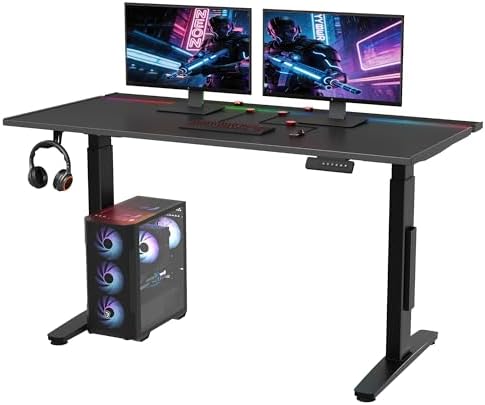
- 【Immersive RGB Gaming Atmosphere】 Features 22 customizable RGB light modes, with sound-reactive lighting effects that sy…
- 【Premium Metal & Magnetic Design】 Constructed with a sturdy iron plate core and integrated magnetic layer for a premium …
- 【Total Cable Control with Magnets】 Revolutionary magnetic cable organizers stick anywhere on the desk. Combined with a h…
- 55×28″ desktop provides a generous work surface for dual monitors and full desk setup
- Clamp power strip integrated outlets and USB ports accessible at the desk without cable runs to the wall
- Electric motor adjusts height smoothly and quietly switches between sitting and standing positions in seconds
- Amazon bestseller in electric standing desks Flexispot is one of the most trusted standing desk brands
An electric standing desk is the home office investment that most directly addresses the health consequences of all-day sitting and the Flexispot EN2 is one of Amazon’s most consistently purchased electric desks because it adds a practical feature most competitors omit: an integrated clamp power strip. No extension cords running across the floor, no reaching to the wall outlet power is accessible at the desk surface itself.
Why we love it
- Integrated clamp power strip keeps outlets at desk level eliminates floor cable runs completely
- 55″ desktop width accommodates dual monitors with keyboard and mouse surface to spare
- Electric motor is quiet enough to raise and lower during calls without audible disruption
- Cable management tray keeps desktop cables organized and off the work surface
The downside | Assembly requires approximately 45-60 minutes and two people for the frame and desktop attachment plan accordingly when scheduling delivery and setup.
Who it’s for | Full-time remote workers ready to make the most significant ergonomic and health investment available for their home office the standing desk that makes alternating positions throughout the workday effortless.
Best Lumbar Support, Cushion Lab Extra Dense Lumbar Pillow (Memory Foam, Dual Strap)

- ✔ SPECIALLY SHAPED BY IN-HOUSE ERGONOMISTS the Ergonomic Seat Cushion is scientifically contoured to cradle your thighs …
- ✔ ADD INSTANT COMFORT TO ANY CHAIR soft hip and thigh cushioning turn any chair into your personal throne. No more back …
- ✔ IMPROVE POSTURE, ALL DAY SITTING COMFORT ergonomic contours encourages proper posture and a straight spine, redistribu…
- Extra dense memory foam maintains firmness through extended sitting, doesn’t flatten over time
- Dual adjustable straps secure to any chair back doesn’t shift or slide during the workday
- Ergonomically contoured shape follows the natural lumbar curve of the lower back
- Amazon bestseller in lumbar support cushions Cushion Lab is the most trusted brand in the category
Lower back pain is the most common physical complaint of remote workers and a quality lumbar support pillow is the most accessible, most immediate fix available without buying a new chair. The Cushion Lab extra dense lumbar pillow is Amazon’s most purchased back support cushion because the extra density maintains its supportive shape through a full workday, rather than compressing flat like standard foam alternatives within a few hours.
Why we love it
- Extra dense memory foam maintains ergonomic support through an 8-hour workday without flattening
- Dual adjustable straps keep the pillow exactly positioned through the workday no repositioning
- Works on office chairs, gaming chairs, dining chairs, and car seats versatile across any sitting situation
- Under $50, the most accessible fix for home office lower back pain without buying a new chair
The downside | Extra dense firmness may feel too hard initially give it 1-2 weeks for your back to adjust to proper lumbar support position before assessing comfort.
Who it’s for | Remote workers who experience lower back pain or fatigue after sitting at their desk the lumbar pillow is the $42 solution that most directly addresses the most common home office physical complaint.
Best Seat Cushion, Everlasting Comfort Office Chair Seat Cushion (Memory Foam, Coccyx Cutout)

- FSA / HSA ELIGIBLE: Experience the exceptional comfort of our memory foam wheelchair seat cushions, designed to provide …
- SUPERIOR CONSTRUCTION: Crafted with premium materials, our wheelchair seat cushions for pressure relief ensures durabili…
- VENTILATED GEL DESIGN: Our cushion features a unique ventilated gel design that keeps you cool and comfortable, preventi…
- Coccyx (tailbone) cutout relieves pressure on the lower spine during extended sitting
- Memory foam density provides pressure-relief support without bottoming out
- Non-slip rubber bottom keeps the cushion in position on any chair surface
- Amazon bestseller in seat cushions Everlasting Comfort is the most purchased brand in this category
Seat cushions are the ergonomic upgrade that most people overlook until they experience tailbone or hip pain from extended sitting. The Everlasting Comfort seat cushion is Amazon’s most purchased chair pad the coccyx cutout is the critical design feature that differentiates it from flat foam pads. By relieving pressure on the tailbone, it eliminates the pain point that makes sitting for 3-4 hours in a row genuinely uncomfortable regardless of chair quality.
Why we love it
- Coccyx cutout eliminates tailbone pressure addresses the most common extended-sitting pain point
- Memory foam provides genuine pressure relief distributes weight across the full seat surface
- Non-slip rubber bottom stays fixed on chair seat through a full workday without repositioning
- Machine-washable cover maintains hygiene remove and wash monthly for a clean working environment
The downside | Adds approximately 2.5 inches of height to any chair tall users may find this positions them too high relative to desk height and may need to readjust chair height accordingly.
Who it’s for | Anyone who experiences discomfort after extended sitting at their desk the seat cushion is the under-$40 upgrade that most immediately improves physical comfort during the workday.
Best Desk Converter, VIVO Dual Monitor Sit-Stand Desk Riser (32″, Wide Keyboard Tray)

- Create Instant Active Standing – VIVO’s desk riser provides on-demand standing throughout the day for the freedom to get…
- Space Efficient 31.5″ Surface – The top surface measures 31.5” x 15.7”, which maximizes space while still providing room…
- Strong 33 lbs Lift Assist – Go from sitting to standing in one smooth motion using the innovative simple touch height lo…
- Converts any fixed desk to a sit-stand workstation no new desk purchase required
- 32″ wide platform holds dual monitors or a monitor and laptop simultaneously
- Wide keyboard tray pulls forward for ergonomic typing position at both seated and standing heights
- Amazon bestseller in desk converters VIVO is the most trusted standing desk converter brand
A full electric standing desk costs $300-500, a desk converter achieves the same sitting-to-standing result for $100 by sitting on top of your existing desk. The VIVO desk converter is Amazon’s most purchased standing desk converter, and it’s the right solution for anyone who wants sit-stand capability without replacing their current desk. The 32″ dual-monitor platform with a sliding keyboard tray creates a complete ergonomic standing workstation out of any existing desk.
Why we love it
- Converts any existing desk no replacement needed, installs in minutes with no tools
- 32″ platform holds dual monitors with space for a coffee mug and small accessories
- Sliding keyboard tray at sitting and standing height proper ergonomic typing position at both
- At $105, delivers 80% of the electric standing desk experience at 30% of the cost
The downside | Converter sits on top of the existing desk surface reduces available desk depth below the converter, which can feel limiting on smaller desks under 48″ wide.
Who it’s for | Anyone who wants sit-stand capability without the cost or assembly of a full electric standing desk the converter is the most accessible path to ergonomic standing work in any existing home office.
How to Build an Ergonomic Home Office Setup in 2026
1. Start with screen position everything else follows
The monitor arm is the first ergonomic upgrade to make because screen position determines posture. Your monitor top edge should be at or slightly below eye level, approximately 20-28 inches from your face. When screen position is correct, head, neck, and shoulder tension reduce naturally fixing the monitor height often improves posture more than any other single change.
2. Address sitting pain before adding movement
If your current chair causes lower back or tailbone pain, add the lumbar pillow and seat cushion before investing in a standing desk or walking pad. These two under-$80 additions often resolve 80% of home office physical discomfort and allow you to sit comfortably for full work sessions creating the foundation for more productive work.
3. Add movement in layers
The standing desk converter is the first layer of movement it allows position changes throughout the day without investment. The electric standing desk is the second layer reliable, memory-preset switching at any moment. The under-desk walking pad is the third layer adds active movement while working. Layer in that order, starting with the most accessible investment.
4. Video call quality is now a professional standard invest in it
In 2026, appearing on video calls with poor lighting and a pixelated built-in camera communicates the same message as arriving to a meeting in inappropriate attire. A 4K webcam with AI noise cancellation signals professionalism and attention to detail. For anyone who presents, sells, teaches, or leads meetings remotely, webcam quality is a directly professional investment.
Frequently Asked Questions
What is the most popular home office ergonomic upgrade in 2026?
Monitor arms and under-desk walking pads are the two most searched ergonomic home office products in 2026. Monitor arms address the immediate daily pain of neck strain from poor screen positioning. Walking pads address the longer-term health concern of all-day sedentary work. Together, they represent the two most impactful ergonomic investments available for any home office setup at any budget level.
Is an under-desk treadmill actually usable while working?
Yes, at walking pace (1-3 mph), most people can type, read, attend calls, and perform standard computer work comfortably. Tasks that require fine motor precision (illustration, video editing) are more difficult while walking. The cognitive adaptation takes 1-2 weeks for most users the first few days of walking while working feel awkward, and it becomes natural quickly. Most users report increased afternoon energy and focus as the primary benefit.
What is the difference between a monitor arm and a monitor riser?
A monitor riser is a fixed-height platform that lifts the monitor to a set elevation it has no adjustability once in position. A monitor arm is a fully articulating mechanical arm that adjusts height, tilt, swivel, and rotation at any time the screen repositions to match any user, any chair height, and any seating posture. For anyone who shares a desk or changes seating positions throughout the day, the arm’s adjustability makes a genuinely functional difference that a riser cannot provide.
Do I need both a lumbar pillow and a seat cushion?
For most home office workers experiencing chair discomfort, yes, they address different pain points. The lumbar pillow supports the lower back and prevents slouching forward. The seat cushion relieves tailbone and hip pressure from the seat surface itself. Most chair discomfort involves both contact points simultaneously, and both products together cost under $80, significantly less than a replacement chair that addresses neither problem as specifically.
Final Thoughts
The home office investments that make the biggest difference in 2026 aren’t the ones that look the best they’re the ones that make working from home genuinely healthier, more comfortable, and more productive every single day. A monitor at eye level, a screen that doesn’t cause neck strain, a seat that doesn’t cause back pain, and the option to walk while you work: these upgrades change how you feel at the end of every workday in a way that no wall art or decorative accessory can replicate.
Our top three to start with? The MOUNTUP Monitor Arm for the immediately effective ergonomic screen positioning upgrade, the Cushion Lab Lumbar Pillow for immediate lower back pain relief, and the WALKINGPAD Under Desk Treadmill for the wellness investment that changes the entire home office experience. All are currently in stock on Amazon with fast Prime shipping.
This post contains affiliate links. If you purchase through our links, we may earn a small commission at no extra cost to you. This helps us continue creating free content for you.