
This post contains affiliate links. If you buy something through one of them, we may earn a small commission at no extra cost to you.
Most home offices run on whatever ceiling light was already there, which was almost certainly picked for a spare room or a guest bedroom, not for sitting under it eight hours a day on video calls. The result shows up in two places looking washed out or shadowed on camera, and a low-grade tiredness by mid-afternoon that people usually blame on everything except the lighting. Both problems have the same root cause, and both get fixed by the same handful of products.
Our Picks at a Glance
| Product | Fixes | Price Range |
|---|---|---|
| HumanCentric Monitor Light Bar | Harsh overhead shadows on video calls | $50–65 |
| ACMEZING Clip-On Ring Light | Uneven, unflattering camera lighting | $30–40 |
| Angetube Webcam with Ring Light | A built-in laptop camera that looks grainy | $35–45 |
| MarsLG Adjustable LED Desk Lamp | Eye strain from close-up screen work | $25–35 |
| Major-Q Arc Floor Lamp | A flat, single-source-lit room | $90–110 |
| Nexillumi LED Strip Lights | Harsh contrast between screen and wall | $25–30 |
| Tonature Cordless Cellular Shades | Window glare washing out the camera | $30–40 |
| Kasa Smart Plug Mini | Manually flipping switches for every light | $12–16 |
| WiZ Smart Color Bulb | One fixture doing both work and wind-down light | $15–20 |
| livho Blue Light Blocking Glasses | End-of-day eye fatigue | $13–16 |
The Video Call Problem
Overhead lighting is the single biggest reason people look tired or shadowed on video calls it lights the top of the head and casts everything below into partial shadow. A monitor light bar solves this by sitting directly above the screen and lighting the face from the front instead. The HumanCentric bar clips onto the top of a monitor with no separate stand needed, and it’s specifically tuned to avoid glare on the screen itself, which cheaper desk lamps repurposed for this job usually can’t manage.

- Present your best with a HumanCentric video conference light, double light kit. Improve your computer light for video co…
- Webcam lighting for video conferencing provides a more professional appearance and streaming presence: Get the ideal vid…
- Easy set up and removal: The monitor or laptop light sits on top of your screen with a webcam style stand. It is meant f…
- Clips onto monitor top, no separate stand required
- Adjustable brightness and color temperature
- Angled to avoid screen glare
For anyone who wants a bit more coverage or works from a laptop without an external monitor to clip onto, a ring light fills a similar role from a slightly different angle. The ACMEZING ring light clips directly onto a laptop screen or monitor edge and adjusts across five color temperatures, so it can match anything from a bright morning call to a dim evening one without looking mismatched.

- Adjustable Color Temperature & Brightness: ACMEZING video conference light has 5 color temperature: Warm warm, Warm whit…
- Ring Light Design & Multi-Purpose: The zoom light adopts ring design to produce a soft, pleasing light that helps to smo…
- Stable Clamp & Flexible Tripod: The metal clip of the laptop light for video conferencing has a strong spring, which is …
- Clip-on ring design, 5 color temperatures, 5 brightness levels
- 64 LED beads, CRI 97+ for accurate skin tones
- Works on laptops, monitors, or tripods
Sometimes the issue isn’t the lighting at all it’s the camera capturing it. Most built-in laptop webcams are genuinely mediocre in anything less than perfect light, which is where a dedicated webcam with its own ring light built in solves two problems in one device. The Angetube webcam pairs a sharper 1080p sensor with an integrated ring light, so there’s no separate light to clip on or position at all.

- 【Three-Level Adjustable Ring Fill Light for Better Portrait】 The streaming webcam built-in ring light offers different l…
- 【【Adjustable Field of View-5X Digital Zoom】 Angetube 967Pro pc web camera support 5X digital zoom even at 1080P. The HD …
- 【HDR or 60FPS mode for you choose】 The Angetube 967Pro usb webcam have two working mode “HDR 30FPS@1080P” or “60FPS@1080…
- 1080p sensor with built-in adjustable ring light
- HDR and auto light correction
- Plug-and-play USB, works with Zoom, Teams, Meet
The Eye Strain Problem
Screen work at close range for hours puts a different kind of strain on the eyes than overhead lighting does, and a proper task lamp is the most direct fix. The MarsLG lamp adjusts across the full 2700K–6500K range, so it can shift from a cooler, alert tone during focused morning work to something warmer by late afternoon, which matters more for sustained comfort than most people expect.

- Provides natural, non-flickering light for stress free productivity and enjoyment
- Simple On/Off switch
- Flexible positioning suitable for use in office, bedroom, school, and reading
- Color temperature adjustable 2700K–6500K
- Touch controls with memory function
- Flexible positioning for desk or shelf use
A single bright light source next to a darker room creates the kind of high contrast that makes eyes work harder to keep adjusting, which is a big part of why a room lit by just a desk lamp or monitor feels tiring by evening. The Major-Q arc lamp fixes that by adding a second, softer source of ambient light across the room, cutting the contrast between the bright screen and everything around it.
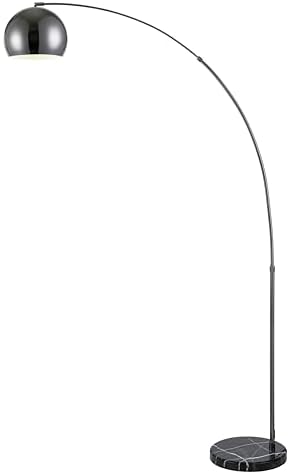
- 14″D x 40.5″W x 79″H ELEVATE YOUR LIVING ROOM DECOR: Our elegant arc floor lamp with drum shade and the stable metal bas…
- LARGER BASE FOR INCREASED STABILITY: Unlike many unstable arched floor lamps for living room, our reaching floor lamp ha…
- OFFER OUR OVERARCHING LAMP AS A SPECIAL GIFT: Show off your excellent taste with a special wedding, birthday or Christma…
- Arching design reaches over a desk or seating area
- Large diffusing shade for soft, even light
- Weighted base for stability
The same contrast problem shows up behind a desk too, particularly with a bookshelf, wall, or media setup that stays dark while a monitor stays bright. The Nexillumi strip lights tuck behind furniture or along a shelf edge to add a low-level glow that closes that gap, which is a small addition that measurably reduces how much the eyes have to readjust every time they glance away from the screen.

- Milloons Colors – Dive into a world of 16 million colors, crafting a spectrum of ambiances. Nexillumi LED Lights for TV …
- Safer to Use – Operated at a safe 5V voltage, TV LED Backlight ensures peace of mind. With just a 5V power bank, the lig…
- Dual Control – Manage your TV LED Lights effortlessly using either the included IR Remote or the “illumiHome” App. Simpl…
- Dimmable, remote-controlled RGB and white light
- Adhesive backing, cuttable to length
- Works well behind monitors, shelves, or desks
Controlling the Light That’s Already There
Natural light is genuinely the best light for video calls, right up until it isn’t a desk facing a bright window creates exactly the silhouette effect that makes video callers invisible against their own background. The Tonature shades control that without blocking the room entirely, filtering the harshest midday glare while still letting in enough ambient light to work by.

- No-drill cordless installation
- Light-filtering honeycomb design cuts glare
- Thermal insulation as a secondary benefit
Multiple lights across a desk setup usually means multiple switches, which in practice means half of them staying on well past when they’re needed or getting skipped entirely because turning each one on individually is a hassle. The Kasa plug puts one of those lights on a schedule or a single app tap, which sounds minor but tends to be the difference between a lighting setup actually getting used consistently and one that quietly reverts to just the overhead light.

- Voice control: Kasa smart plugs that work with Alexa and Google Home Assistant. Enjoy the hands free convenience of cont…
- Easy set up and use: 2.4GHz Wi-Fi connection required. Plug in, open the Kase app, follow the simple instructions and en…
- Scheduling: Use timer or countdown schedules set your smart plug to automatically turn on and off any home electronic ap…
- Compact WiFi smart plug, no hub required
- App and voice control via Alexa or Google Home
- Scheduling for automatic on/off
The main overhead fixture in most home offices is stuck at one fixed color and brightness, which works fine for a video call at 9am and considerably less fine for winding down at 6pm in the same chair. A smart bulb like the WiZ solves that with one swap cooler, brighter light during work hours, and a warmer, dimmer setting once the workday’s actually over.
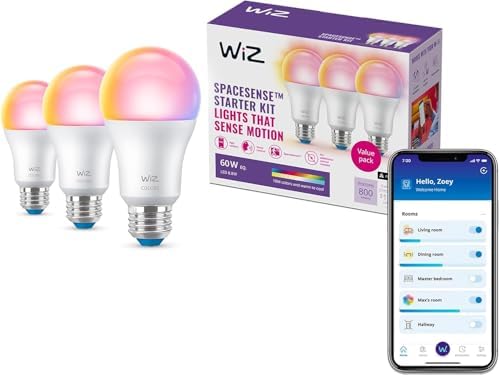
- CONVENIENT SMART LIGHTING: Control WiZ light bulbs using the WiZ app, the WiZ remote, or with voice commands to Alexa, G…
- EASY TO AUTOMATE: Smart color changing light bulb turns on automatically from sunset to sunrise when connected to Alexa …
- CUSTOMIZABLE: Adjust schedules, choose from 16 million colors or shades of warm to cool whites, change brightness, or si…
- Tunable white and full color range
- App and voice control, schedulable
- Standard A19 base, no hub required
The Last Line of Defense
Even with better lighting throughout the room, hours of close screen focus still adds up, and this is where blue light glasses earn their spot not as a replacement for good lighting, but as a supplement for the specific strain that comes from the screen itself rather than the room around it. The livho glasses use a clear anti-glare lens rather than a heavy amber tint, so they don’t noticeably shift screen colors while still cutting glare and filtering blue light.

- Elevate your screen time comfort with these stylish women’s/men’s eyewear frame blue light blocking glasses, designed to…
- Enhance your visual clarity and reduce eye fatigue with these transparent blue-light glasses, featuring a chic women’s e…
- Protect your eyes from blue light and glare with these women’s eyewear frame bluelight blocking glasses, designed for sc…
- Clear anti-glare lens, minimal color distortion
- UV protection alongside blue light filtering
- Lightweight frame for all-day wear
Building the Setup in the Right Order
Start with whichever problem is actually the bigger one if video calls are the daily pain point, the HumanCentric bar or ACMEZING ring light comes first, paired with the Angetube webcam if the built-in laptop camera is part of the problem too. If it’s afternoon eye fatigue that’s the real issue, the MarsLG task lamp and Major-Q floor lamp matter more, since they’re solving contrast and close-range strain rather than how the room looks on camera. The Nexillumi strips and Tonature shades are supporting players either way they reduce the background contrast that makes both problems worse. And the Kasa plug and WiZ bulb are what keep the whole system running without becoming its own daily chore, since a lighting setup that’s too much effort to use consistently doesn’t end up helping much at all.
FAQ
Do I need both a ring light and a monitor light bar, or just one?
For most people, just one is enough they solve a similar problem from slightly different angles. A ring light tends to give more even, all-around illumination and is easier to add to a laptop with no external monitor, while a light bar sits more discreetly and avoids the ring-shaped catchlight sometimes visible in glasses or eyes.
What color temperature is best for a home office overall?
Somewhere around 4000K–5000K (cool white to daylight) tends to work best for focused work and video calls, since it’s close to natural daylight and renders skin tones accurately on camera. Warmer tones (2700K–3000K) feel cozier but can look slightly yellow-toned on a webcam if used as the only light source.
Can blocking window glare with shades actually improve video call quality?
Yes, meaningfully a bright window directly behind or beside a desk forces a camera to expose for the window, which darkens the face in the process. Filtering that light with shades like the Tonature set, rather than eliminating it completely, tends to give the most balanced, natural-looking result on camera.
Is it worth replacing a built-in laptop camera instead of just improving the lighting?
It depends on the laptop. Older or budget laptop cameras often can’t process even good lighting well, in which case a dedicated webcam with better sensor quality like the Angetube makes a more noticeable difference than lighting adjustments alone. Newer laptops with solid built-in cameras usually get most of the benefit from lighting improvements without needing a separate webcam at all.
Final Thoughts
A home office rarely needs a lighting overhaul it needs two or three specific fixes aimed at whichever problem is actually happening: looking bad on calls, feeling tired by the afternoon, or both. Solve those directly, and the rest of the room usually falls into place around it.